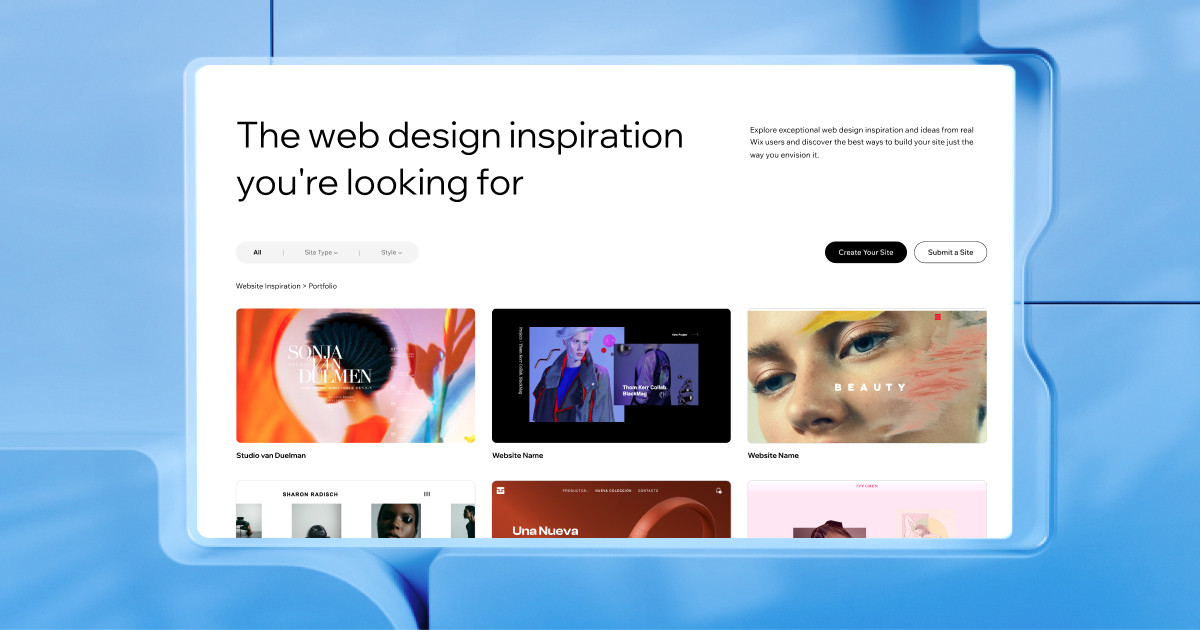
Overview: Discover the Potential of WiX as Your Website Builder
Seeking a platform to craft a stunning website without the complexities of coding? WiX stands out as a leading cloud-based website builder meticulously designed to empower users of all technical abilities. Renowned for its intuitive drag-and-drop editor, a vast library of professionally crafted templates, and a dynamic app ecosystem, WiX remains a top-tier solution for small businesses, creative professionals, and ambitious entrepreneurs looking to establish a strong online presence.
In this in-depth WiX review, we will meticulously examine its core features, explore the intricacies of its pricing and plans, assess its overall ease of use, analyze its performance and features through benchmark data, delve into the quality of its customer support, and ultimately determine which types of users can truly harness the full potential of this versatile web design tool. Join us as we navigate the landscape of WiX and help you decide if it’s the right website builder to bring your online vision to life.
Thinkific

Pros and Cons
Now that we have a foundational understanding of WiX let’s delve into a balanced perspective by exploring its key strengths and potential drawbacks. This will provide a clearer picture of whether its inherent characteristics align with your specific website-building needs.
The Upsides: What Makes WiX a Compelling Choice?
WiX boasts several compelling advantages contributing to its popularity among a diverse user base. These positive aspects streamline the website creation and offer valuable tools for online success.
| ✅ Pros | Description |
|---|---|
| Easy-to-use drag-and-drop interface | Empowering beginners and experienced users alike with a visually intuitive editor, requiring no coding knowledge for website customization. |
| Over 800 designer-made templates | Offering a vast selection of professionally designed and industry-specific templates, providing a solid foundation for any website style. |
| Built-in SEO, marketing, and analytics tools | Equipping users with essential tools to optimize their website for search engines, implement marketing campaigns, and track website performance directly within the platform. |
| Extensive app marketplace for added functionality | Providing access to a rich ecosystem of apps and integrations to extend website capabilities, from contact forms and live chat to booking systems and more. |
| Free plan available | Offering a risk-free entry point to explore the platform’s basic features and build a functional website with WiX branding and a subdomain. |
Navigating the Potential Downsides: Areas to Consider
While WiX offers numerous benefits, it’s crucial to acknowledge its limitations to ensure it aligns with your long-term goals and technical comfort level.
| ❌ Cons | Description |
|---|---|
| Template switching is not possible after publishing | Requiring users to rebuild their website from scratch if they decide to change templates after their site has gone live, emphasizing the importance of initial template selection. |
| Some advanced features have a learning curve | Indicating that while the basic interface is user-friendly, mastering some of the more sophisticated tools and functionalities may require additional time and effort. |
| Pricing can increase for full eCommerce functionality | Highlighting that accessing the complete suite of eCommerce features and tools may necessitate upgrading to higher-tier, potentially more expensive, subscription plans. |
By carefully considering these pros and cons, you can begin to assess whether the strengths of WiX outweigh its limitations in the context of your specific website objectives and technical proficiency. Let’s now move on to explore who WiX is best suited for.
Who Thrives with This Platform?
Having weighed the advantages and disadvantages, it’s essential to pinpoint the specific user profiles for whom WiX is an exceptionally well-suited website builder. While its user-friendly nature appeals to a broad audience, confident individuals and businesses will find its particular strengths especially beneficial. Let’s explore the key user types that often find WiX to be their ideal online partner.
Tailored Solutions: Matching WiX’s Strengths to User Needs
The versatility of WiX allows it to cater to a diverse range of website creators. However, some user groups will find its feature set and design philosophy particularly advantageous.
| User Type | Why WiX Works |
|---|---|
| Small Businesses | WiX offers a rapid setup process, integrated marketing tools, and the ability to incorporate online booking systems or basic online store functionalities, providing a comprehensive starting point for establishing an online presence. |
| Freelancers & Creatives | The platform’s robust visual design flexibility and a wide array of stunning portfolio templates empower freelancers and creative professionals to showcase their work in an aesthetically pleasing and impactful manner. |
| First-time Website Owners | The intuitive interface coupled with the innovative ADI (Artificial Design Intelligence) powered site-building tool makes WiX exceptionally accessible for individuals creating their very first website, guiding them through the process seamlessly. |
| Bloggers & Content Creators | WiX provides user-friendly blog management tools and straightforward monetization integrations, enabling bloggers and content creators to easily share their ideas and potentially generate revenue from their online content. |
| eCommerce Starters | For those venturing into the world of online sales, WiX offers an all-in-one store management system, eliminating the immediate need for complex third-party applications and streamlining the initial setup of an online shop. |
WiX shines for individuals and smaller entities, prioritizing ease of use, visual appeal, and integrated functionalities without the immediate need for highly complex or deeply customized solutions. As we continue our WiX review, we will delve deeper into the features that make it a compelling option for these user groups.
Core Functionality and Key Features
To truly understand the capabilities of WiX as a website builder, it’s essential to dissect its core functionalities. This section will provide a detailed breakdown of the key features that empower users to effectively create and manage their online presence.
1. The Intuitive Canvas: Exploring the Drag-and-Drop Editor
At the heart of WiX lies its renowned drag-and-drop editor. This visual interface liberates users from coding constraints, allowing for effortless customization of website pages. Elements such as text boxes, images, buttons, and videos can be seamlessly positioned anywhere on the page with a simple click, drag, and drop. This free-form placement offers a significant advantage over more structured, grid-based web design tools like Squarespace, providing unparalleled creative control over the layout and aesthetics of your website.
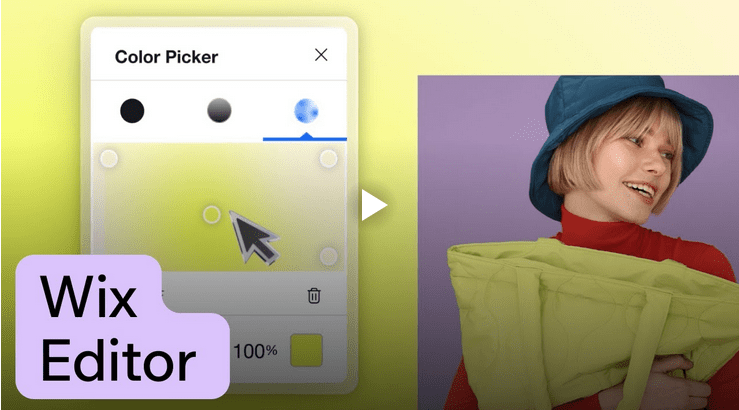
[WiX Editor as source by WiX]

2. Instant Website Creation: Leveraging the Power of WiX ADI
For those new to website creation or seeking a rapid online presence, WiX ADI (Artificial Design Intelligence) offers a remarkable solution. This intelligent tool streamlines the initial website-building process by asking users targeted questions about their business or personal needs. WiX ADI automatically generates a personalized website with relevant sections, content suggestions, and a cohesive design based on these responses. While offering a hands-off approach, WiX ADI still provides surprising levels of customization, allowing users to fine-tune the generated site to match their specific preferences.
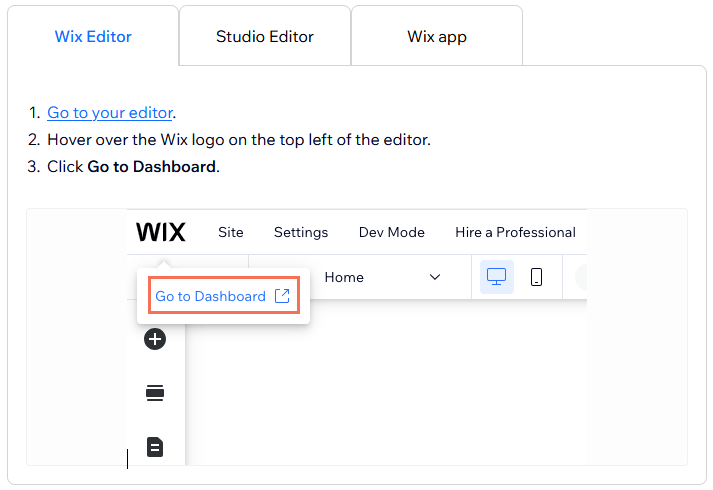
[WiX Review – Dashboard Access – Source WiX]
3. Building Your Digital Storefront: Unveiling WiX’s eCommerce Capabilities
WiX Stores provides a comprehensive and integrated eCommerce platform for entrepreneurs and businesses looking to sell products and services online. This robust feature set equips users with the necessary tools to launch and manage their online shop effectively:
- Product Variants: Easily offer product variations such as multiple sizes, colors, and material options, each with its own associated images and inventory tracking.
- Payment Gateways: Seamlessly integrate with many popular payment gateways, including PayPal, Stripe, and Square, ensuring secure and convenient transaction processing for your customers.
- Shipping Options: Configure diverse shipping options, including flat rates, regional-specific pricing, and real-time shipping cost calculations, catering to various customer needs and locations.
- Tax Management: Simplify tax compliance with automatic tax calculations powered by Avalara (where applicable), ensuring accurate tax collection based on customer location.
- Abandoned Cart Recovery: Re-engage potential customers and recover lost sales with automated abandoned cart recovery emails, available on the Business Unlimited plan and higher.
- Multi-currency Support: Expand your global reach by enabling multi-currency support, allowing customers to browse and purchase products in their preferred currency.
- Transaction Fees: It’s important to note that WiX itself does not charge additional transaction fees on sales; however, third-party payment processors like Stripe or PayPal will typically apply their fees per transaction.
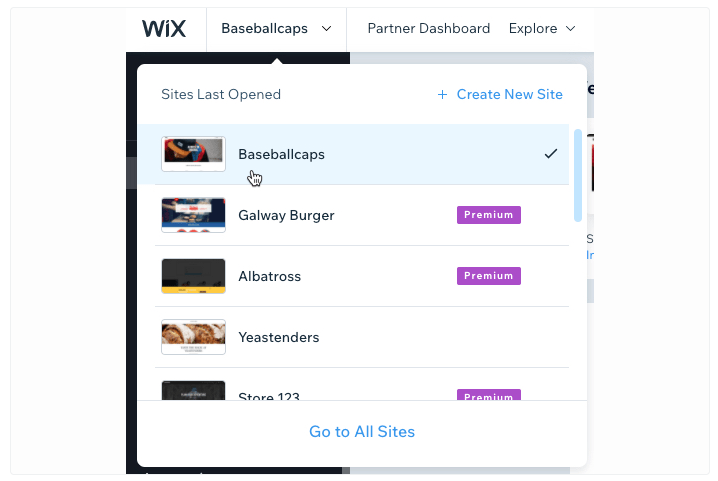
[WiX Review – Dashboard – Source Wix]
These core features highlight WiX’s commitment to providing a user-friendly yet powerful platform for building various websites, from simple personal pages to fully functional online stores. As we continue our WiX review, we will explore the crucial aspects of the integrated SEO and marketing tools within the platform.
SEO and Marketing Arsenal
A visually appealing website is only the foundation of online success. To truly thrive, your site must be discoverable by search engines and effectively engage your target audience. Recognizing this, WiX integrates a suite of essential SEO and marketing tools.
| Feature Category | Specific Tool/Setting | Description | Availability |
|---|---|---|---|
| SEO | Custom Meta Titles and Descriptions | Allows users to define how their web pages appear in search engine results pages (SERPs), optimizing for relevant keywords. | Built-in |
| SEO | Canonical Tags | Helps manage duplicate content by specifying the preferred URL version for search engines, improving SEO efficiency. | Built-in |
| SEO | 301 Redirects | Enables permanent redirection of outdated or moved URLs to new ones, preserving link equity and user experience. | Built-in |
| SEO | Structured Data Support | Facilitates the implementation of schema markup, providing search engines with more contextual information about your content, potentially enhancing rich snippets in search results. | Built-in |
| SEO | Integration with Google Search Console | Allows direct connection and verification of your WiX site with Google’s webmaster tools for performance monitoring, error identification, and sitemap submission. | Built-in |
| SEO | WiX SEO Wiz | A user-friendly, step-by-step guide designed to assist users, particularly beginners, in optimizing their website’s fundamental SEO settings for better search engine visibility. | Built-in |
| Marketing | Email Campaigns | Enables the creation and distribution of targeted email marketing campaigns directly from the WiX platform to nurture leads, promote content, and drive sales. | Via WiX Ascend (often an add-on or included in higher-tier pricing and plans) |
| Marketing | Social Media Integration | Facilitates seamless connection and sharing of website content across various social media platforms, promoting brand consistency and audience engagement. | Via WiX Ascend (often an add-on or included in higher-tier pricing and plans) |
| Marketing | Pop-up Lead Capture Forms | Provides tools to create and implement engaging pop-up forms on the website to effectively capture visitor information and build valuable email lists for future marketing efforts. | Via WiX Ascend (often an add-on or included in higher-tier pricing and plans) |
Performance You Can Rely On: How Fast and Stable Is Your WiX Website?
Your website’s performance isn’t just a technical detail—it’s a direct reflection of your brand. A slow, unstable site can frustrate visitors, drive them away, and even hurt your search rankings. Fortunately, WiX has taken big steps to ensure your site loads quickly and stays reliably online.
Think of Your Website Like a Storefront
Imagine walking into a physical store: if the doors are stuck or the aisles are cluttered, you’re not staying long. The same goes for your website. WiX enhances performance by streamlining the digital experience through key technologies:
- Global Content Delivery Network (CDN): WiX uses a worldwide network of servers to deliver your site’s content from the location closest to each visitor. This reduces load times no matter where your audience is browsing from.
- Smart Image Optimization: Large images are a common speed killer. WiX automatically compresses and optimizes your visuals without compromising quality—so your pages look great and load fast.
WiX Performance Metrics
To give you real insight into how WiX stacks up, here are recent performance benchmarks based on independent testing:
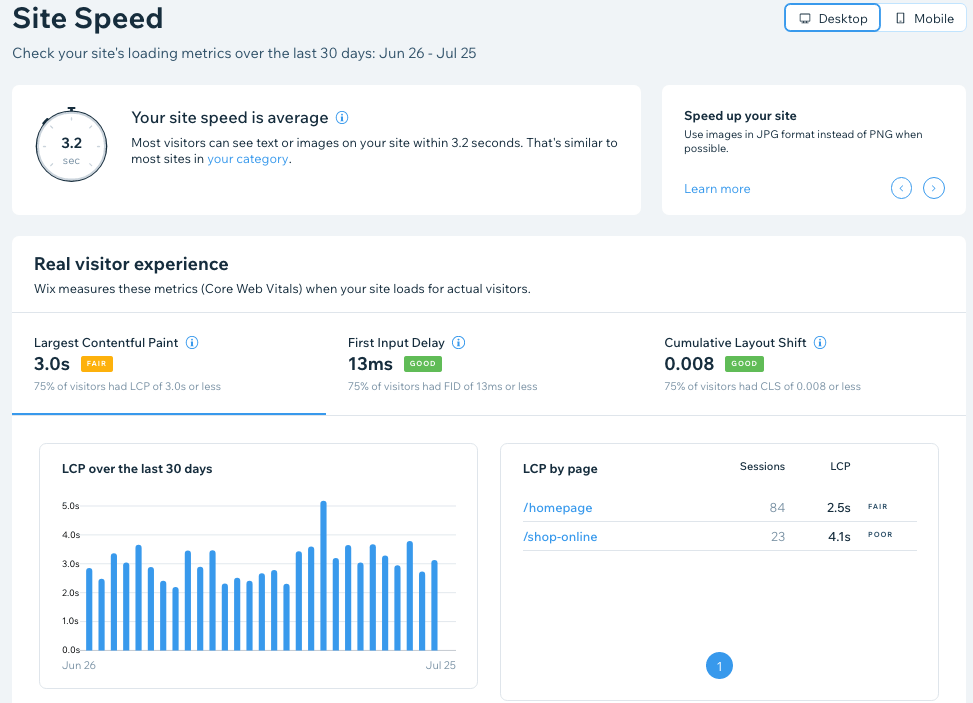
[WiX Metrix – Source WiX]
- ✅ 99.98% Uptime – Always Open for Business
- Your site stays accessible around the clock, minimizing downtime and lost opportunities.
- ⚡ Speed That Keeps Visitors Engaged
- Mobile Load Time: ~2.5 seconds
- It keeps mobile users from bouncing, which is especially important in today’s mobile-first world.
- Desktop Load Time: ~1.8 seconds
- Fast access on desktop for a smooth, professional experience.
- 📈 Core Web Vitals – Meeting Google’s Standards
- Largest Contentful Paint (LCP): 2.1 seconds — Great loading speed
- First Input Delay (FID): 49 ms — Excellent responsiveness
- Cumulative Layout Shift (CLS): 0.09 — Strong visual stability
- These scores reflect how well WiX supports smooth, interactive, and visually stable experiences—key user satisfaction and SEO factors.
Template Design and Flexibility
WiX offers over 800 templates across categories such as:
- Business & Services
- Online Store
- Portfolio & CV
- Blogs & Forums
- Health & Wellness
- Restaurants & Events
Each template is mobile-responsive and fully editable. However, once you publish your site, you cannot switch templates without rebuilding—something to remember when starting.
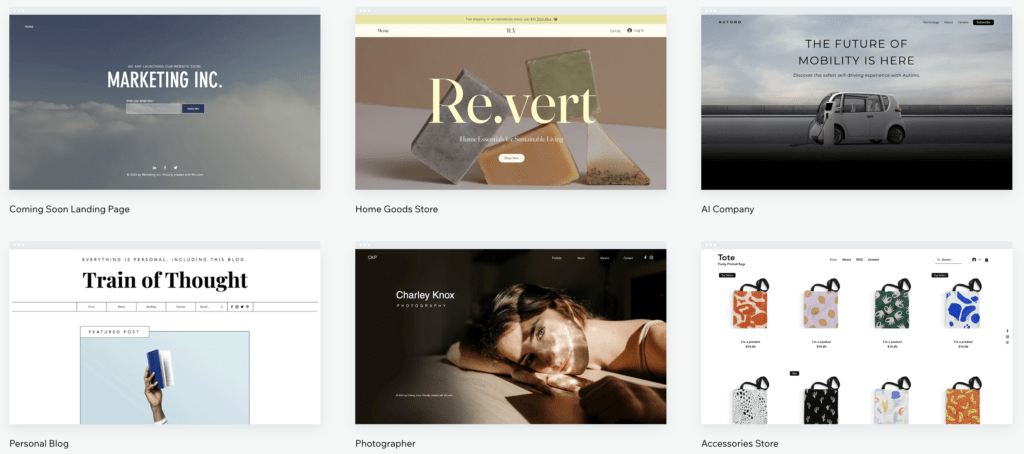
[WiX Templates – Source Wix]
App Market and Integrations
The WiX App Market contains 300+ tools to extend your site. Key integrations include:
- Mailchimp
- Google Analytics
- Printful (for print-on-demand)
- Hotjar
- Facebook Pixel
Apps range from free to premium, with many offering trial versions.
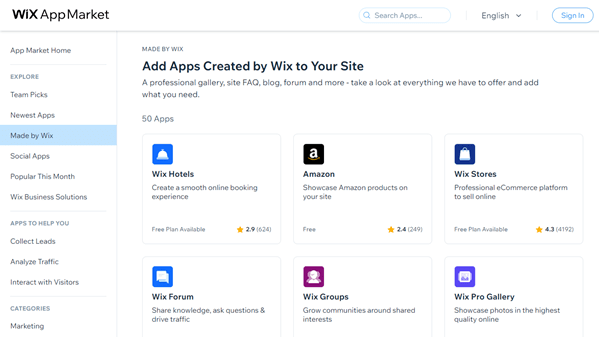
[“WiX App Market” – Image by WiX]
WiX Pricing Plans
Investing in a website builder is important, and understanding the pricing and plans is crucial. WiX offers a tiered structure designed to cater to various needs, whether you’re just starting or running a growing business. Let’s break down the options to help you find the perfect fit.
For Individuals and Small Projects: Website Plans
If your primary goal is to build a personal website, portfolio, or basic site for your small venture, these plans offer a range of features to get you started:
| Plan | Price (USD/month) | Best For | Key Features |
|---|---|---|---|
| Free | $0 | Testing the platform and basic personal use | WiX branding, WiX subdomain, limited storage and bandwidth. |
| Combo | $16 | Personal websites and freelancers | Removes WiX branding, connect custom domain, increased storage and bandwidth. |
| Unlimited | $22 | Entrepreneurs and bloggers | Enhanced storage and bandwidth, additional apps, and tools for growth. |
| Pro | $27 | Branded small business sites | Full professional features, logo maker, social media logo files. |
| VIP | $45 | Priority support and advanced features | Highest support level, priority response, advanced analytics, more storage. |
For Selling Online: Business & eCommerce Plans
If your goal is to sell products or services online, WiX offers specialized plans packed with e-commerce functionalities:
| Plan | Price (USD/month) | Includes |
|---|---|---|
| Business Basic | $27 | Secure online payments, customer accounts, basic e-commerce tools. |
| Business Unlimited | $32 | Everything in Business Basic plus subscriptions, more storage, abandoned cart recovery. |
| Business VIP | $59 | Full e-commerce features, priority support, advanced analytics, unlimited video hours. |
Important Note on Pricing:
Please remember that the prices listed above are in US Dollars and may vary depending on your country or region. For the most accurate and localized pricing information, we recommend visiting the official WiX pricing page. You might also find it helpful to use a currency converter for up-to-date costs in your local currency.

Customer Support
WiX provides various ways to get help building and managing your website:
- Self-Help: Their extensive Help Center offers articles, videos, and FAQs covering most topics.
- Email Support: All users can submit support tickets for assistance.
- Priority Support: Higher-tier plans (Pro & VIP) benefit from a priority callback service for quicker phone support.
- In-App Guidance: The WiX Editor includes built-in tips and walkthroughs.
Overall, WiX offers a solid support system with resources for all users and faster options for premium subscribers.




WiX vs The Competition
Choosing the right website builder involves understanding how different platforms stack up. Here’s a concise overview of how WiX compares to some popular alternatives:
| Platform | Best For | Standout Feature | Starting Price (from) | Key Takeaway |
|---|---|---|---|---|
| WiX | Versatile, all-around use | Intuitive drag-and-drop | Free / $17/mo | Excellent for visual builders seeking flexibility and a large app market. |
| Squarespace | Visually driven projects | Elegant, design-centric | $16/mo | Ideal for portfolios and businesses prioritizing sophisticated aesthetics. |
| Weebly | Simple sites & basic stores | Easy drag-and-drop, app store | Free / $10/mo | User-friendly for beginners, though customization can be less extensive. |
| Webflow | Advanced design & custom code | Powerful visual coding | $14/mo | Geared towards designers and developers needing granular control. |
Note: Starting prices are typically for basic paid plans billed annually and can vary. “Free” indicates a limited free plan is available. The “Best For” and “Standout Feature” are generalizations to highlight primary strengths.
Final Verdict
Choosing the right foundation for your online presence is a pivotal decision. WiX emerges as a compelling website builder, particularly for those who prioritize creative freedom without the complexities of code. It empowers small businesses, creatives, and solopreneurs to launch stylish and functional websites swiftly, offering an impressive array of built-in tools to get you started.
While platforms like the highly flexible WordPress or the dedicated e-commerce powerhouse Shopify might offer greater depth in specific areas, WiX carves out a significant sweet spot—this powerful yet accessible platform balances user-friendliness with robust features.
To assist in your decision-making, we’ve evaluated WiX across several key parameters:
💰 Affordability & Value: 🟢🟢🟢🟢☆ (8.5/10) –
🖥️ Ease of Use & User Experience: 🟢🟢🟢🟢🟢 (9/10)
⚡ Performance & Uptime: 🟢🟢🟢🟢☆ (8.5/10)
🔐 Features, Resources & Security: 🟢🟢🟢🟢☆ (8.5/10)
📞 Customer Support & Critical Considerations: 🟢🟢🟢🟢☆ (8.5/10)
The Bottom Line: If your priority is a visually rich, user-friendly website builder that allows you to bring your creative vision to life without coding, WiX stands out as an excellent choice in 2025. It’s ideal for quickly establishing a professional online presence for personal projects, small businesses, and creative portfolios. However, your long-term strategy demands ultimate design control. In that case, with extensive custom coding capabilities or a highly specialized and scalable e-commerce solution from the outset, exploring platforms like WordPress or Shopify might be beneficial. Ultimately, the best path forward depends on your unique needs and the scale of your online ambitions.
Read our review:
Disclosure: This post may contain affiliate links. We only recommend products we believe in, and We may receive a commission at no cost to you! Thank you for your support!
Acknowledgement: Cover Image by Unsplash.com
Disclaimer: The information is provided for general information only – moneycatzzz.com makes no representations or warranties in relation to the information, including but not limited to any representation or warranty as to the fitness for any particular purpose of the information to the fullest extent permitted by law. While every effort has been made to ensure that the information provided in this article is accurate, reliable, and complete as of the time of writing, the information provided in this article should not be relied upon to make any financial, investment, real estate or legal decisions. Additionally, the information should not substitute advice from a trained professional who can take into account your personal facts and circumstances, and we accept no liability if you use the information to form decisions.