
Squarespace has carved a significant niche in the competitive DIY website builder landscape, and this Squarespace review underscores why. Squarespace offers an undeniably elegant solution for creatives seeking a visually stunning online portfolio and businesses aiming to establish a sophisticated e-commerce platform. Its intuitive design ethos, coupled with increasingly sophisticated AI tools, streamlines the process of building a compelling web presence.
Beyond aesthetics, Squarespace delivers a robust suite of features designed for a polished user experience. From the foundational security of free SSL certification and the convenience of domain registration (included with annual plans) to seamless integrations with vital business applications, Squarespace positions itself as a top-tier contender for those prioritizing both form and function in their online endeavors. This Squarespace review will delve into the core strengths that make it a compelling choice, particularly for the discerning creative professional and the ambitious e-commerce entrepreneur.
Thinkific

Pros and Cons
Choosing the right platform for your online presence requires a clear understanding of its strengths and weaknesses. This Squarespace review distills the pros and cons into an easily digestible table format to aid creatives and e-commerce ventures in their decision-making process.
| Pros | Cons |
|---|---|
| Elegant and Professionally Designed Templates | No Long-Term Free Plan |
| Intuitive and User-Friendly Interface | Limited Design Flexibility (Compared to Some) |
| All-in-One Platform Convenience (Hosting, SSL, Domain) | Template Switching Limitations (Post-Launch in 7.1) |
| Strong Emphasis on Visual Presentation | Potentially Higher Pricing |
| Robust E-commerce Integration | Curated App Ecosystem (Smaller than Some) |
| Solid Blogging Functionality | Learning Curve for Specific Customizations |
| Mobile-Responsive Designs | Grid-Based Editor Constraints (for Free-Form Design) |
| Helpful Customer Support | |
| Increasingly Sophisticated AI Tools (Fluid Engine, Content) |
Creatives and businesses focused on e-commerce should weigh these factors carefully against their specific needs and priorities when considering Squarespace as their website builder.

Who Thrives with This Platform?
Understanding the ideal user profile is crucial when evaluating a platform like Squarespace. This section of our Squarespace review outlines the types of individuals and businesses most likely to flourish within its elegant and integrated ecosystem, particularly when considering its strengths for creatives and e-commerce ventures.
Ideal User Profile | Why Squarespace is a Strong Fit Across the board, Squarespace caters particularly well to individuals and entities, prioritizing elegant design and a user-friendly, all-in-one platform. Its inherent strengths in visual presentation and streamlined workflows make it an attractive option for those who value aesthetics and ease of use above highly granular control or extensive third-party ecosystem.
Squarespace Pricing Plans
Squarespace understands that different aspirations require tailored tools, and its pricing structure reflects this nuanced approach. Unlike competitors who dangle the allure of indefinite free plans, Squarespace offers a valuable 14-day trial, allowing potential users to explore its capabilities before commitment thoroughly. This trial period ensures that investing in Squarespace is a decision rooted in firsthand experience.
A Clear Breakdown for Creatives and E-Commerce Ventures
Squarespace presents a tiered system of plans, each designed to cater to specific needs and growth trajectories. Below is a clear overview of the current offerings:
| Plan Name | Starting Price (Annual Billing) | Key Features | Ideal For |
|---|---|---|---|
| Personal | $16/month | Ideal for portfolios, blogs, and basic websites; includes free domain registration (first year), free SSL certificate, and unlimited storage. | Individual creatives, bloggers, and those needing a simple online presence. |
| Business | Approximately $23/month | Enhanced design customization, marketing integrations, support for additional contributors. | Small businesses seeking a professional online presence. |
| Basic Commerce | Around $27/month | Tailored for online selling; reduces transaction fees and includes advanced e-commerce tools. | Businesses starting to sell online. |
| Advanced Commerce | About $49/month | Comprehensive e-commerce features including advanced reporting, real-time shipping integrations, and premium integrations with services like Xero. | Established e-commerce businesses with scaling needs. |
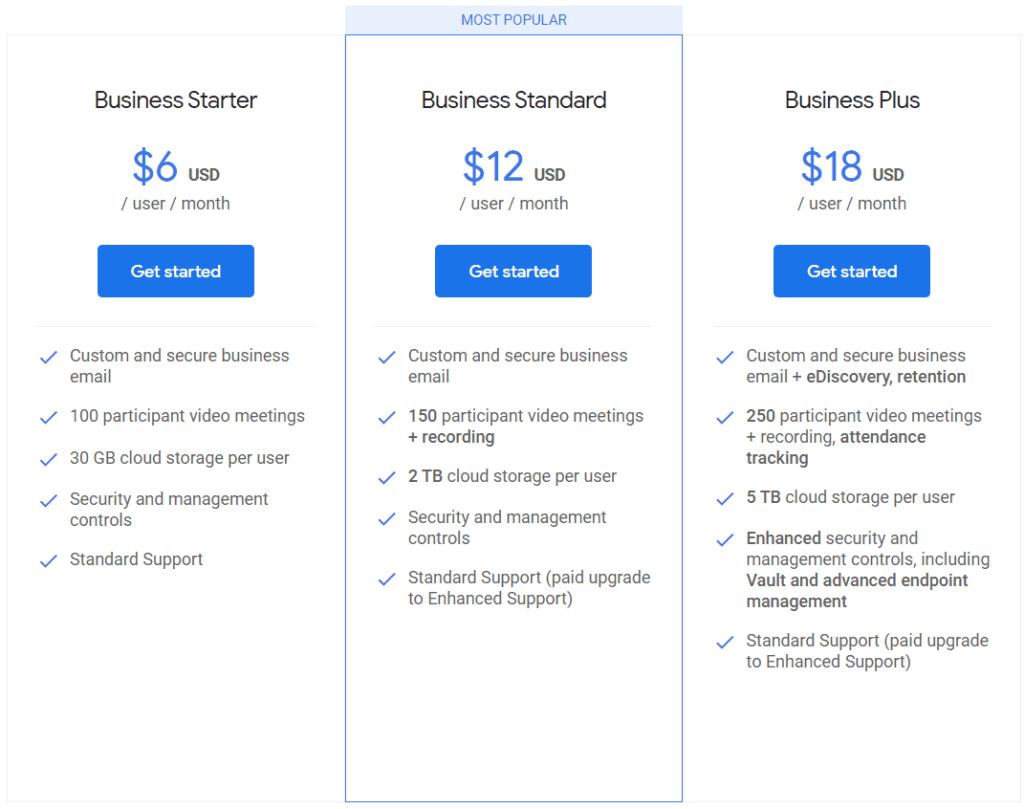
Key Considerations for Squarespace Pricing:
- All Squarespace plans include reliable website hosting with generous unlimited storage and monthly data transfers.
- Opting for an annual plan unlocks the benefit of free domain registration for the first year (standard domain fees apply in subsequent years).
- Subscribers on a monthly billing cycle will incur domain registration fees from the outset.
- For a comprehensive understanding of all associated costs and the most up-to-date information, it is advisable to consult the official Squarespace pricing page directly.
Squarespace’s pricing strategy offers a scalable pathway, ensuring that whether you’re a solo creative showcasing your work or an ambitious entrepreneur launching an e-commerce empire, there’s a plan designed to fuel your online success.
Squarespace First Steps
Embarking on your Squarespace journey is designed to be a streamlined and encouraging process, particularly for creatives and those venturing into e-commerce. The platform prioritizes a smooth initial experience, guiding new users from template selection to basic site customization with intuitive ease.
1. Template Selection: Your Design Foundation
The first step in building your Squarespace presence involves choosing a template. Recognizing that visual appeal is paramount for many users, especially creatives, Squarespace offers a curated library of professionally designed templates spanning various categories. Whether your focus is on showcasing a portfolio, launching an online store, managing a blog, or simply establishing a business website, Squarespace provides categorized options (e.g., Portfolio, Online Store, Blog, Services, Community).
The template selection process is user-friendly:
- Categorized Browsing: Users can filter templates based on their website’s primary purpose or industry, making it easier to narrow down the options.
- Visual Previews: Before committing, you can preview each template to see a live demo with sample content, providing a clear understanding of its layout and design elements.
- Focus on Style, Not Just Niche: While categories exist, Squarespace emphasizes that all templates within the current 7.1 version offer the same underlying capabilities and extensive customization options. This encourages users to choose based on initial aesthetic preference rather than being locked into specific features tied to a category.

[Squarespace Design – Source Squarespace]
2. The Onboarding Flow: A Gentle Introduction
Squarespace guides new users through a basic onboarding process upon selecting a template. This typically involves:
- Account Creation: Setting up your Squarespace account is straightforward, with options to sign up via email, Google, or Apple. A free 14-day trial begins immediately, allowing ample time to explore the platform without initial financial commitment.
- Site Naming: You’ll be prompted to name your website and establish its identity. This can be easily changed later.
- Interactive Tips (Optional): Squarespace often provides helpful tooltips and introductory screens that highlight key areas of the interface and guide you through initial customization steps, such as adding pages or editing the homepage layout.
- Dashboard Overview: The main Squarespace dashboard is organized, providing access to key areas like Pages, Design, Commerce, Marketing, Analytics, and Settings. The intuitive layout helps new users orient themselves quickly.

[“Squarespace Templates” – Source Squarespace]
3. Initial Customization: Making it Your Own
The initial experience focuses on empowering users to personalize their chosen template:
- Pre-designed Homepage as a Starting Point: Each template has a pre-built homepage featuring sample sections and content. This provides a tangible starting point that users can immediately begin to modify.
- Intuitive Editing Interface: Squarespace’s drag-and-drop interface, particularly with the Fluid Engine in version 7.1, allows for easy rearrangement and addition of page sections and elements. Double-clicking on elements enables direct content editing.
- Basic Styling Options: Even during the initial setup, users can typically access basic styling options like color palettes and font pairings, allowing quick visual adjustments to align with their brand or personal preference.
- Adding Core Pages: The platform prompts users to add essential pages like “About,” “Contact,” or a “Blog,” making it easy to establish the basic structure of their website.
The “Getting Started” experience with Squarespace is generally smooth and user-friendly. The emphasis on visually appealing templates and a guided onboarding process helps users feel confident in their first steps. While the depth of customization becomes apparent as you delve deeper, the initial phase is designed to be accessible even for those with limited web design experience, setting a positive tone for building a sophisticated online presence.
Building and Customization
The heart of the Squarespace experience lies in its robust yet user-friendly tools for building and customizing your online presence. This section of our Squarespace review delves into the platform’s editing interface, the breadth of its customization options, and its integrated media management capabilities, all crucial for creatives and e-commerce ventures alike.
| Feature Category | Key Aspects | Benefits for Creatives | Benefits for E-commerce |
|---|---|---|---|
| Editing Interface | Visual WYSIWYG Editor, Section-Based Architecture, Fluid Engine (Drag & Drop), Inline Editing, Sidebar | Direct manipulation, flexible layouts, real-time preview, easy content integration. | Efficient product page creation, streamlined content updates, intuitive store design. |
| Customization Options | Global Design Panel (Fonts, Colors, etc.), Section-Specific Adjustments, Custom CSS, AI Assistance, Templates | Consistent branding, unique visual styles, advanced design control, AI-powered inspiration. | Brand alignment across product listings and store pages, tailored visual merchandising. |
| Media Management | Integrated Image Editor, Central Asset Library, Getty Images Integration, Gallery Blocks, Video Embedding | Easy portfolio creation, visually rich content, professional stock image access. | High-quality product image presentation, engaging video demonstrations, organized assets. |
Building and customizing your website with Squarespace is a well-integrated and largely intuitive experience. Combining a visual editor, comprehensive design controls, and efficient media management tools empowers users to create professional-looking and highly functional websites without extensive coding knowledge. The platform balances providing structure through templates and sections while offering ample flexibility for personalization, making it a strong choice for visually-driven creatives and businesses focused on establishing a compelling e-commerce presence.
Key Functionalities & Features
Beyond its elegant design and user-friendly interface, Squarespace boasts a robust suite of key functionalities and features designed to empower creatives, support thriving e-commerce ventures, and facilitate effective online presence management. This section of our Squarespace review delves into the core tools that make Squarespace a versatile platform.
| Feature Category | Key Features & Description |
|---|---|
| 1. Robust E-commerce Capabilities | – Unlimited Product Listings: Sell physical goods, digital downloads, and services without limits. – Integrated Shopping Cart & Secure Checkout: Supports multiple payment gateways (Stripe, PayPal, Apple Pay, Square) for a secure buying experience. – Product & Order Management: Manage inventory, track SKUs, organize products, process orders, and manage shipping details. – Customer Account Management: Enable account creation, order history review, and streamlined checkouts. – Marketing & Promotional Tools: Use discounts, coupons, and email/social media integrations. – Advanced Features (Higher Tiers): Abandoned cart recovery, advanced shipping calculations, real-time carrier integration, subscription selling. |
| 2. Enhanced Blogging and Content Management | – Rich Text Editor: Create visually appealing posts with text, images, videos, and embedded content. – Categorization & Tagging: Organize posts for better reader experience and SEO. – Scheduling & Draft Management: Schedule future posts and save drafts. – Social Sharing Integration: Easily share content across social platforms. – RSS Feed Generation: Automatically create RSS feeds for content subscriptions. – Podcast Integration: Seamlessly host and distribute audio content through platforms like iTunes. |
| 3. Complementary Marketing Tools | – Squarespace Email Campaigns: Build and send newsletters, announcements, and promotional emails directly from your account. – Social Media Integrations: Automatically share content on platforms such as Facebook and Instagram to drive traffic. – SEO Tools: Optimize your site with customizable URLs, meta descriptions, and alt text for images to boost search engine visibility. |
| 4. Integrated Scheduling with Acuity Scheduling | – Online Appointment Booking: Let clients easily schedule appointments based on your availability. – Calendar Synchronization: Integrate with Google Calendar, Outlook, etc., to prevent double-bookings. – Automated Reminders & Notifications: Reduce no-shows with automatic email and SMS reminders. – Payment Processing: Securely collect payments directly through the scheduling tool. – Membership & Subscription Options: Offer recurring services and build a loyal client base. |
| 5. Mobile Optimization and Dedicated Apps | – Automatic Mobile Optimization: Every template is fully responsive, adapting seamlessly to any screen size. – Mobile Information Bar: Prominently display key contact info on mobile devices. – Mobile Preview: View and adjust your website’s mobile layout within the editor. – Dedicated Mobile Apps: Manage content, order processing, and analytics on the go via iOS and Android apps. |
Squarespace’s key functionalities and features provide a comprehensive toolkit for creatives and e-commerce businesses. From its robust online selling capabilities and practical blogging tools to its integrated marketing solutions and convenient scheduling features, Squarespace aims to be an all-in-one platform that empowers users to build, manage, and grow their online presence efficiently and effectively, all while maintaining its signature elegant design aesthetic.
Squarespace Analytics
Understanding your website’s performance is crucial for any online venture. Squarespace provides a robust suite of built-in analytics tools and integrates with key services to offer valuable metrics for tracking growth, understanding user behavior, and optimizing search engines (SEO).
| Metric Category | Key Metrics & Tools | Relevance for Creatives | Relevance for E-commerce |
|---|---|---|---|
| Website Traffic | Visits, Unique Visitors, Page Views, Bounce Rate, Time on Page, Exit Rate | Understanding audience reach, engagement with portfolio/content. | Tracking potential customer flow, identifying popular product pages. |
| Traffic Sources | Direct, Search Engines, Social Media, Referrals | Evaluating effectiveness of promotional efforts, understanding where audience comes from. | Identifying successful marketing channels, understanding customer acquisition. |
| Search Performance | Google Search Keywords (via GSC), SEO Titles, Meta Descriptions, Alt Text, Sitemap | Understanding search terms driving traffic to portfolio, optimizing content for visibility. | Identifying keywords attracting potential buyers, optimizing product page visibility. |
| Audience Insights | Demographics, Geographic Locations, Devices | Tailoring content and outreach to specific audience segments. | Understanding customer demographics and device preferences for optimal experience. |
| Form & Button Data | Conversion Rates | Measuring engagement with contact forms, calls to action on portfolio. | Tracking lead generation, effectiveness of calls to action on product pages. |
| E-commerce Metrics | Revenue, Orders, Units Sold, Conversion Rate, Average Order Value, Revenue per Visit | Understanding sales of digital art, services, or creative products. | Key performance indicators for online store success, identifying sales trends. |
| Sales Funnel | Purchase Behavior, Abandoned Carts | Identifying potential roadblocks in purchasing creative work/services. | Optimizing the checkout process, recovering lost sales. |
| Integration | Google Analytics | Advanced audience analysis, conversion tracking, detailed behavioral insights. | Comprehensive e-commerce tracking, marketing attribution, deeper customer understanding. |
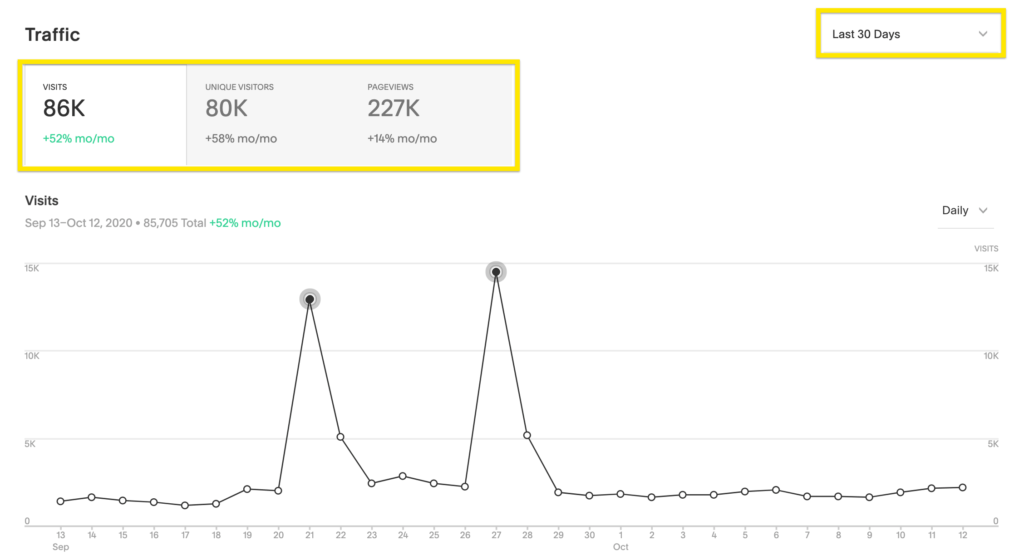
[“Squarespace Traffic Analytics” _ Source Squarespace]
Squarespace allows seamless integration with Google Analytics for more advanced and customizable analytics. This provides a deeper dive into user behavior, demographics, conversion tracking, and more sophisticated reporting.
Key Takeaways for Understanding Squarespace Metrics:
- Built-in Analytics is Powerful: Squarespace provides a comprehensive overview of essential website metrics directly within the platform, which is particularly valuable for understanding traffic, engagement, and basic sales data.
- E-commerce Insights are Robust: Commerce plans unlock detailed sales analytics crucial for optimizing online stores.
- SEO Basics are Covered: Squarespace provides the foundational tools for good SEO practices.
- Integration Enhances Capabilities: Connecting to Google Search Console and Google Analytics unlocks more advanced insights and tracking.
- Regular Monitoring is Key: Consistently reviewing your Squarespace metrics is essential for identifying trends, understanding your audience, and making data-driven decisions to improve your website’s performance and achieve your goals.

Performance, Support, and Tools
For any serious online endeavor, whether showcasing creative portfolios or driving e-commerce sales, the underlying performance of the platform, the availability of practical Support, and the tools provided for growth (like analytics and SEO) are paramount. This section of our Squarespace review examines these critical aspects.
| Aspect | Core Features | Benefits & Impact |
|---|---|---|
| Reliable Performance & Uptime | – Built on a global CDN ensuring fast load times – Transparent system status updates for regular monitoring – Minimal downtime with a stable infrastructure | – Consistent and reliable user experience across all geographic locations – Helps maintain customer trust and upholds SEO rankings through dependable accessibility |
| Comprehensive Analytics | – Real‑time tracking of website visits, unique visitors, and page views – Detailed insights on visitor demographics and device usage – Analysis of traffic sources and popular content – Google Search Console integration – Advanced e‑commerce insights in commerce plans | – Empowers data‑driven decisions for content and marketing strategies – Enables precise targeting and optimization of marketing efforts – Provides critical performance metrics to drive business growth |
| Foundational SEO Tools | – Customizable, SEO‑friendly URLs – Optimized meta titles, descriptions, and alt text for images – Auto‑generated XML sitemap – Free SSL certificate – Mobile‑responsive design – Guided SEO checklist | – Improves search engine visibility and overall website ranking – Enhances accessibility and user engagement – Simplifies on‑page SEO management with built‑in optimization tools |
| Reliable & Responsive Customer Support | – 24/7 email support available for any queries – Live text chat support offered during business hours for real‑time assistance – Comprehensive Help Center with detailed guides and tutorials – Active community forums – (Note: No phone support) | – Quick and effective resolution of issues, ensuring smooth operations – Comprehensive resources empower self‑help – Community engagement offers additional insights and shared experiences |
Squarespace’s key functionalities and features provide a comprehensive toolkit for creatives and e-commerce businesses. From its robust online selling capabilities and practical blogging tools to its integrated marketing solutions and convenient scheduling features, Squarespace aims to be an all-in-one platform that empowers users to build, manage, and grow their online presence efficiently and effectively, all while maintaining its signature elegant design aesthetic.



Squarespace vs. the Competition
While Squarespace is a strong contender in the website builder arena, understanding its position relative to key competitors like Wix, Weebly, and Webflow is crucial for making an informed decision. Each platform offers a unique blend of features, ease of use, and target audiences.
To provide a clearer comparison, here’s a table summarizing the key differences between Squarespace, Wix, Weebly, and Webflow:
| Feature | Squarespace | Wix | Weebly | Webflow |
|---|---|---|---|---|
| Design Focus | Elegant, curated templates, structured editing | Highly flexible drag-and-drop, large template library | Easy drag-and-drop, simpler templates | Unparalleled design flexibility, code-like control |
| Ease of Use | Intuitive, clean interface, structured workflow | Generally easy, but extensive options can be overwhelming | Very easy, straightforward drag-and-drop | Steep learning curve, geared towards designers |
| E-commerce | Robust integrated features, strong visual focus | Strong with app integrations, can feel fragmented | Basic on lower tiers, improving on paid plans | Powerful for custom e-commerce solutions |
| Pricing | No free long-term plan, mid-range pricing | Free plan (limited), wide range of tiers | Free plan (limited), generally lower pricing | Can be complex, depends on traffic and features |
| App Ecosystem | Curated, fewer third-party integrations | Large app marketplace | Limited app store | Primarily built-in functionality |
| Design Flexibility | Good, but within template structure | Very high with free drag-and-drop | Moderate, less layout control | Extremely high, code-level visual control |
| Learning Curve | Moderate | Moderate | Easy | Very steep |
| Target Audience | Creatives, small-medium businesses (design-focused) | Small businesses, diverse needs, design freedom seekers | Beginners, budget-conscious users | Professional designers, agencies, complex sites |
The “best” website builder ultimately depends on individual needs and priorities. Squarespace carves its niche by offering a compelling balance of elegant design, user-friendliness, and robust features, particularly for visually oriented users and those seeking a streamlined, all-in-one platform. While Wix provides greater design freedom and a more extensive app ecosystem, Weebly offers extreme ease of use and a free e-commerce option, and Webflow caters to professional designers needing ultimate customization; Squarespace remains a strong contender for those who value sophisticated aesthetics and a cohesive, integrated experience.
FAQ about Squarespace
Q1: Who is Squarespace best suited for?
A: Squarespace is particularly well-suited for individual creatives (artists, designers, photographers), small to medium-sized e-commerce businesses seeking visually appealing storefronts, service-based professionals who value elegant design and integrated scheduling, and anyone prioritizing a polished online presence with ease of use and strong integrated features.
Q2: How does Squarespace compare to Wix regarding design flexibility and pricing?
A: While both are user-friendly, Wix offers greater design flexibility with its free drag-and-drop editor and a wider range of pricing tiers, including a limited free plan. Squarespace provides more curated, elegant templates with a structured editing approach and generally lacks a long-term free plan, often positioning its paid plans at a slightly higher price point.
Q3: What are some of the key features Squarespace offers for e-commerce?
A: Squarespace provides robust e-commerce capabilities, including unlimited product listings, integrated shopping cart and secure checkout, product management tools (inventory, options), order management, customer accounts, and various marketing/promotional features. Higher-tier plans unlock advanced functionalities like abandoned cart recovery and real-time shipping integration.
Q4: What kind of support and performance can I expect from Squarespace?
A: Squarespace offers reliable performance and uptime through its global CDN. For support, they provide 24/7 email assistance and live text chat during business hours. While phone support is unavailable, their support is generally praised for responsiveness and effectiveness. They also offer comprehensive built-in analytics and foundational SEO tools to help users understand and grow their online presence.
Final Thoughts and Verdict
After comprehensively exploring its features, performance, and suitability for various users, this Squarespace review culminates in a final verdict and recommendation. Squarespace has consistently presented itself as a refined and versatile website builder, particularly excelling for creatives seeking elegant online portfolios and businesses venturing into e-commerce.
To provide a broader perspective and assist in your decision-making, we’ve also considered how a major competitor, Wix, stacks up across several key parameters based on industry evaluations:
- 💰 Affordability & Value: 🟢🟢🟢🟢☆ (9/10)
- 🖥️ Ease of Use & User Experience: 🟢🟢🟢🟢🟢 (9/10)
- ⚡ Performance & Uptime: 🟢🟢🟢🟢☆ (8.5/10)
- 🔐 Features, Resources & Security: 🟢🟢🟢🟢☆ (9.2/10)
- 📞 Customer Support & Critical Considerations: 🟢🟢🟢🟢☆ (8.7/10)
Squarespace Strengths: Elegant design & user interface, robust e-commerce, reliable performance & uptime, integrated marketing/scheduling, solid growth tools (analytics/SEO), dependable support.
Squarespace Considerations: No long-term free plan (unlike Wix), less design flexibility than Wix, limited post-launch template switching (unlike Wix), and potentially higher pricing than some Wix tiers.
Best Suited For: Individual creatives (portfolios), small-to-medium e-commerce, service-based businesses, users valuing aesthetics and ease of use (less need for extensive third-party integrations than Wix).
Squarespace is a top-tier builder in 2025, excelling in elegant design and integrated features, offering a streamlined experience for visually focused users. While Wix offers more design freedom and a free plan, Squarespace is ideal for those prioritizing cohesive aesthetics and an all-in-one solution. Choose based on your design needs and budget.
Read our review:
Disclosure: This post may contain affiliate links. We only recommend products we believe in, and We may receive a commission at no cost to you! Thank you for your support!
Acknowledgement: Cover Image by Unsplash.com
Disclaimer: The information is provided for general information only – moneycatzzz.com makes no representations or warranties in relation to the information, including but not limited to any representation or warranty as to the fitness for any particular purpose of the information to the fullest extent permitted by law. While every effort has been made to ensure that the information provided in this article is accurate, reliable, and complete as of the time of writing, the information provided in this article should not be relied upon to make any financial, investment, real estate or legal decisions. Additionally, the information should not substitute advice from a trained professional who can take into account your personal facts and circumstances, and we accept no liability if you use the information to form decisions.