
Choosing the best-managed WordPress hosting is paramount for a thriving online presence. If lightning-fast speed, unwavering security, and exceptional support are non-negotiable for your blog, freelance platform, entrepreneurial venture, or agency, you’ve landed in the right place.
This comprehensive WP Engine Review for 2025 offers an insightful journey into their premium offerings. We meticulously dissect WP Engine’s features, performance benchmarks, pricing structures, and user-friendliness, providing a clear understanding of its value proposition. Furthermore, we draw insightful comparisons with leading competitors like Kinsta and Flywheel, explore practical email hosting alternatives, and illuminate the intuitive user dashboard experience.
For serious individuals, scaling businesses, and discerning agencies focused on the WordPress ecosystem, the quest for optimal performance, robust security, and readily available expertise often leads to WP Engine. Join us as we explore whether this acclaimed managed WordPress hosting provider truly lives up to its esteemed reputation in 2025.
Thinkific

What is WP Engine? Pioneering Premium Managed WordPress Hosting
WP Engine is a leading premium managed WordPress hosting provider, a category it has significantly helped shape since its founding in 2010. Recognizing the unique demands of the WordPress platform, WP Engine was built to serve individuals and businesses who demand unparalleled reliability and performance. Exclusively dedicated to WordPress websites, the company has earned a distinguished reputation among site owners seeking top-tier speed and a hassle-free hosting experience, free from the complexities of server management.
Key benefits of choosing WP Engine include:
- High-performance servers finely tuned for optimal WordPress operation, leveraging years of platform-specific expertise.
- A global Content Delivery Network (CDN) powered by Cloudflare, ensuring rapid content delivery worldwide – a feature continuously refined over their history.
- Automatic daily backups with effortless one-click restoration, a foundational element of their managed approach.
- Advanced security features encompass complimentary SSL certificates and robust DDoS protection, reflecting their long-standing commitment to safeguarding WordPress sites.
WP Engine’s enduring focus on customer-centric support and the continuous evolution of its state-of-the-art technology since its early days positions it as a premier choice for individuals seeking the pinnacle of WordPress web hosting.

[“WP Engine – Solutions” – Source WP Engine]
Pros and Cons
Choosing the right managed WordPress hosting is a critical decision. WP Engine stands out for its premium features and performance, but it is essential to understand its strengths and potential drawbacks. This balanced overview helps you determine if WP Engine is the ideal fit for your WordPress needs.
| Pro | Con |
|---|---|
| Blazing-Fast WordPress Performance: Optimized for speed with high-performance servers and a global CDN. | Premium Pricing: Higher cost compared to budget or shared hosting. |
| Robust & Proactive WordPress Security: Comprehensive protection including daily backups and free malware scanning. | No Native Email Hosting: Requires integration with third-party email providers. |
| Empowering Developer Tools: Staging environments, Git integration, and SSH access. | WordPress-Only Platform: Exclusively designed for WordPress. |
| Exceptional 24/7 Expert WordPress Support: Fast and knowledgeable assistance from WordPress specialists. | Learning Curve (Advanced Features): May require time for non-technical users. |
| Intuitive & User-Friendly Dashboard: Easy management of WordPress sites, analytics, and backups. |
WP Engine excels in providing a high-performance, secure, and expertly supported environment specifically for WordPress. While the premium pricing and lack of native email are factors to consider, the benefits are significant for those prioritizing speed, reliability, and dedicated WordPress expertise.
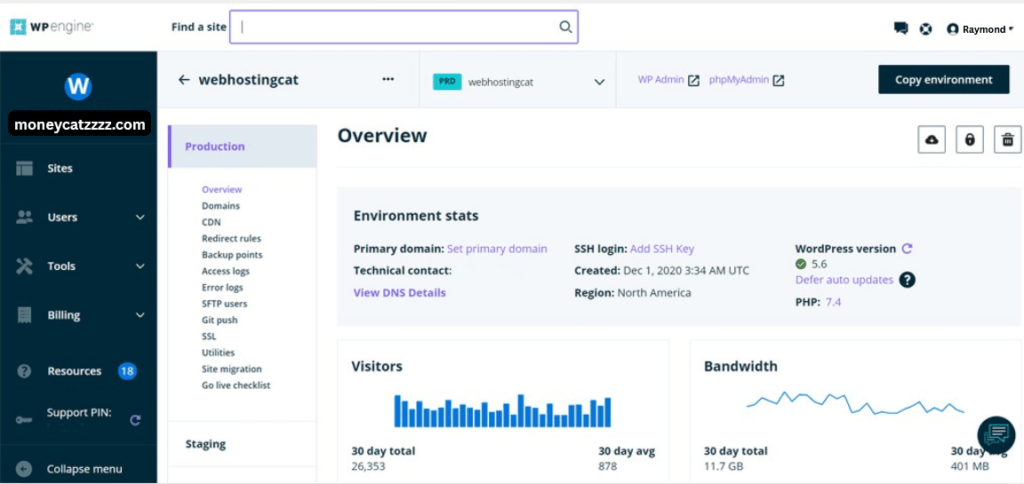
[“WP Engine Dashboard” – Source WP Engine]
Performance: Speed & Uptime
For website owners who understand that every millisecond counts, performance – encompassing speed and uptime – is paramount. WP Engine distinguishes itself in managed WordPress hosting by providing an infrastructure meticulously engineered for exceptional responsiveness and consistent availability.
WP Engine guarantees an impressive 99.95% uptime, effectively minimizing downtime and ensuring your WordPress website remains consistently accessible to your audience. This reliability is underpinned by a sophisticated architecture built for speed:
- Global Content Delivery Network (CDN): By strategically distributing your website’s content across a network of servers worldwide, WP Engine’s integrated CDN significantly reduces latency, resulting in noticeably faster loading times for visitors regardless of their geographic location. This is crucial for user experience and SEO.
- Servers Optimized for WordPress: Unlike generic hosting solutions, WP Engine’s servers are specifically configured and fine-tuned to meet the unique demands of the WordPress platform. This dedicated optimization ensures efficient resource allocation, quicker processing of requests, and an overall smoother performance.
- Intelligent Caching with EverCache®: WP Engine’s proprietary EverCache technology represents a significant advantage. This advanced caching system intelligently stores and delivers website content, drastically reducing server load and delivering lightning-fast page load speeds. This not only enhances user satisfaction but also provides a significant boost to your website’s SEO rankings.
WP Engine’s commitment to a high-performance infrastructure, featuring a global CDN and WordPress-optimized servers coupled with intelligent caching, translates into a superior user experience and a solid foundation for your online success. Your WordPress website will be both fast and consistently available.
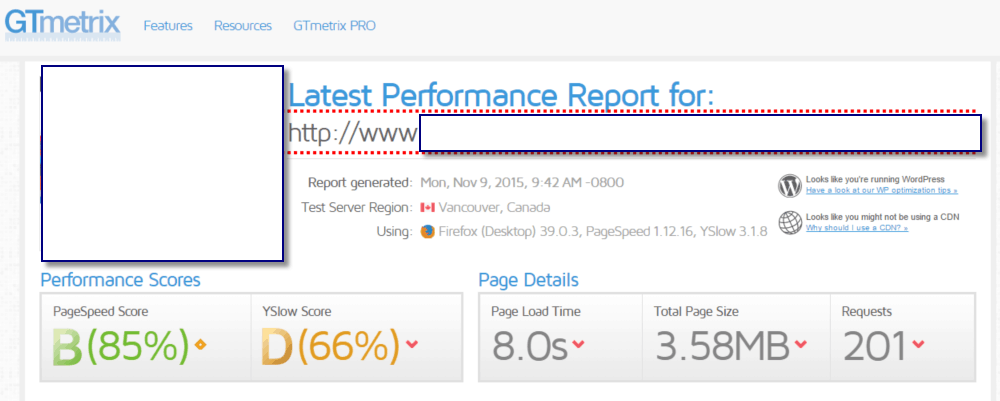
[“WP Engine – GTmetrix” – Source WP Engine]
WP Engine and WordPress
WP Engine goes beyond basic hosting, offering a comprehensive suite of features meticulously crafted for WordPress users. These tools streamline your workflow, enhance your website’s capabilities, and provide peace of mind.
Key Features Designed for WordPress Success:
| Feature | Description | Benefit |
|---|---|---|
| Daily Backups | Automatic daily backups with easy one-click restoration. | Ensures data safety and facilitates quick recovery. |
| Staging Environments | Isolated environments for testing themes, plugins, and code changes before going live. | Minimizes risk of errors on the live site and allows for safe experimentation. |
| Developer Tools | SSH access, Git integration, proprietary caching system. | Provides advanced control, efficient workflow for developers, and performance optimization. |
| Automatic WordPress Updates | Handles core WordPress updates, and plugin/security updates on some plans. | Keeps your site secure, stable, and running on the latest versions with minimal effort. |
| Free SSL Certificates | Included with all plans, encrypting data transfer. | Builds trust with visitors and improves SEO rankings. |
| StudioPress Themes | Access to premium, professionally designed themes (on select plans). | Provides a solid foundation for a visually appealing and high-performing website. |
Security
WP Engine takes a proactive and multi-layered approach to safeguarding your WordPress website. Their robust security framework provides a secure hosting environment, allowing you to focus on your content and audience.
Robust Security Measures Protecting Your Investment:
| Security Feature | Description | Benefit |
|---|---|---|
| Daily Malware Scanning | Regular and automatic scans to detect and remove malicious threats. | Safeguards your site’s integrity and prevents security breaches. |
| Free SSL Certificates | Included with all plans, encrypting data transfer between the server and users. | Protects sensitive data and builds trust with visitors. |
| DDoS Protection | Mitigation strategies to protect against Distributed Denial-of-Service attacks. | Ensures your website remains online and accessible even during malicious attacks. |
| Web Application Firewall (WAF) | Monitors and filters out malicious traffic, preventing exploits. | Adds an extra layer of security by blocking known and emerging threats. |
Customer Support
WP Engine is renowned for its exceptional and readily available customer support, a key differentiator for many WordPress users. Their commitment to providing knowledgeable and timely assistance ensures you have the help you need when you need it.
Unparalleled Customer Focus with Expert Support:
| Support Feature | Description | Benefit |
|---|---|---|
| 24/7 Live Chat Support | Immediate assistance from knowledgeable WordPress experts with fast response times (typically under 30 seconds). | Provides quick and efficient help whenever you need it. |
| Phone Support | Direct assistance with complex issues (available on higher-tier plans). | Offers a more personal and direct line of communication for intricate problems. |
| Extensive Knowledge Base | A wealth of detailed guides, articles, webinars, and resources for self-help. | Empowers users to find answers and troubleshoot issues independently. |
| Free Site Migrations | Expert team offers complimentary and hassle-free migration services. | Simplifies the process of moving your existing WordPress website to WP Engine. |
Pricing
While WP Engine positions itself as a premium managed WordPress hosting provider, understanding its pricing structure and the user-friendliness of its platform is crucial for making an informed decision. This section breaks down their plans and explores the intuitive nature of their custom dashboard.
WP Engine Pricing Plans:
WP Engine offers tiered pricing plans designed to cater to a range of users, from individual bloggers to large-scale businesses. While these plans reflect the premium nature of their managed services, they also include a robust set of core features:
| Plan | Price (Monthly) | Best For | Key Inclusions |
|---|---|---|---|
| Startup | $20 | Single, smaller websites, personal portfolios | WP Engine CDN, Daily Backups, Automated Restore, Advanced Security Protocols, Free Expert Migration |
| Professional | $39 | Growing businesses, freelancers managing a few sites | WP Engine CDN, Daily Backups, Automated Restore, Advanced Security Protocols, Free Expert Migration |
| Growth | $77 | Larger websites, businesses with higher traffic | WP Engine CDN, Daily Backups, Automated Restore, Advanced Security Protocols, Free Expert Migration |
| Scale | Contact Sales | Mission-critical sites requiring high performance and scalability | WP Engine CDN, Daily Backups, Automated Restore, Advanced Security Protocols, Free Expert Migration, Enhanced Support |
It’s important to note that all WP Engine plans include their proprietary CDN for enhanced speed, automatic daily backups with easy restoration, advanced security protocols, and free expert migration assistance, highlighting the comprehensive value offered despite the premium pricing.

[“WP Engine – Costs” – Source WP Engine]
User Interface and Ease of Use
Effortless Management: The Intuitive WP Engine User Dashboard
WP Engine’s custom-designed user portal is a standout feature, prioritizing simplicity and efficiency. The intuitive interface streamlines website management, making it accessible to beginners and experienced WordPress users.
Key Features of the WP Engine User Dashboard:
| Feature | Description | Benefit |
|---|---|---|
| Centralized Site Management | Manage all your WordPress installations from a single, organized interface. | Provides a clear overview and easy access to all your websites. |
| Effortless Backup Management | Easily initiate on-demand backups and restore your site from previous versions with a few clicks. | Ensures data safety and provides a simple recovery process. |
| Simplified Staging Management | Create, deploy, and manage staging environments for safe testing of changes. | Reduces the risk of errors on your live site and facilitates efficient development workflows. |
| Comprehensive Analytics | Access key website performance metrics directly within the dashboard. | Offers valuable insights into your website’s traffic and performance. |
| Clear Billing & Account Settings | Easily manage your subscription details, payment methods, and user permissions. | Provides transparency and control over your account. |
As one user noted, “The user interface is sleek and simple, making it easy even for non-tech-savvy individuals to handle their website.” This focus on user experience ensures that managing your premium WordPress hosting environment with WP Engine is powerful and straightforward.
WP Engine vs The Competition
When considering managed WordPress hosting, comparing WP Engine with more budget-friendly options like Bluehost and Hostinger is natural. While these alternatives offer lower entry points, they differ significantly in features, performance, and support.
Here’s a breakdown of key differences:
It’s important to note that all WP Engine plans include their proprietary CDN for enhanced speed, automatic daily backups with easy restoration, advanced security protocols, and free expert migration assistance, highlighting the comprehensive value offered despite the premium pricing.
| Feature | WP Engine | Bluehost | Hostinger | Key Takeaway |
|---|---|---|---|---|
| Performance | Global CDN, optimized servers, proprietary caching (sub-1.5s load times) | Good performance (higher tiers better), free CDN | Excellent speed optimization, LiteSpeed servers (some plans) | WP Engine: Focuses on premium, optimized WordPress performance. Bluehost & Hostinger: Offer good performance, especially on higher-tier plans, but may not be as WordPress-specific. |
| Support | 24/7 live chat, phone (higher tiers), WordPress experts | 24/7 live chat, phone, email (can be variable quality) | 24/7 live chat, email, knowledge base (response times can vary) | WP Engine: Known for knowledgeable WordPress-specific support. Bluehost & Hostinger: Offer support across various hosting types, which may impact WordPress expertise depth. |
| Pricing | Premium pricing, feature-rich plans (from $20/month) | Lower introductory pricing, higher renewal rates | Very affordable entry-level options, varying renewal rates | WP Engine: Higher initial cost reflects managed WordPress focus and features. Bluehost & Hostinger: More budget-friendly initially but renewal costs should be considered. |
| Email Hosting | No native support, requires third-party integration | Included in most plans | Included in most plans | Bluehost & Hostinger: Offer integrated email hosting. WP Engine: Requires a separate email hosting provider. |
| User Experience | Custom intuitive UI | cPanel with a custom overlay for WordPress | Custom hPanel | WP Engine: Streamlined, WordPress-focused dashboard. Bluehost: Industry-standard cPanel with beginner-friendly additions. Hostinger: Modern, custom hPanel designed for ease of use. |
| WordPress Focus | Exclusively managed WordPress hosting | Offers various hosting types, including WordPress-optimized plans | Offers various hosting types, with a strong focus on WordPress | WP Engine: Purely dedicated to WordPress. Bluehost & Hostinger: Offer WordPress-specific plans but also cater to other website types. |



Key Considerations:
- WP Engine: Best for users who prioritize premium performance, dedicated WordPress expertise, and robust features, even with a higher price tag.
- Bluehost: A good option for beginners and those on a tighter budget who need integrated email and a familiar cPanel interface, but performance and support can vary.
- Hostinger: Offers very affordable entry-level pricing and good performance, especially for the cost, with a user-friendly custom panel, but support might not be as WordPress-specialized as WP Engine.
Ultimately, the “right” choice depends on your specific needs, budget, technical expertise, and your importance on managed WordPress-specific features and support.
Email Integration
Email for WP Engine: Simple Third-Party Integration
Since WP Engine focuses on top-tier WordPress hosting, it doesn’t include native email. You’ll need to use a separate email provider. Here are two good options:
1. Zoho Mail:
- Free and paid plans with custom domain emails (e.g., [email address removed]).
- User-friendly and has 24/7 support.
- Integrates easily by updating DNS records (WP Engine provides guides).
2. Google Workspace:
- Provides professional Gmail with your domain, plus calendar and collaboration tools.
- Requires updating DNS records for integration (WP Engine has instructions).
While WP Engine lacks built-in email, integrating with reliable services like Zoho Mail or Google Workspace is straightforward and ensures you have robust email functionality for your domain. Check WP Engine’s guides for easy setup.


WP Engine Dashboard and Control
WP Engine’s custom dashboard is a major plus. It is known for its clean and intuitive design, making WordPress management straightforward.
Key Dashboard Features for Easy Control:
- Centralized Site Management: Manage all your WordPress sites from one straightforward interface.
- Effortless Staging: Easily create, deploy, and manage staging environments for safe testing.
- Comprehensive Analytics: Quickly access key website performance data.
- Simplified Backups: Easily create on-demand backups and restore your site.
- Clear Account Management: Manage billing details and user permissions with ease.
In short, WP Engine’s well-designed dashboard ensures efficient and hassle-free management of your WordPress hosting, even for those with limited technical skills.
Who is WP Engine For?
WP Engine’s premium managed WordPress hosting is a powerful solution, but it’s not necessarily the perfect fit for everyone. Here’s a breakdown of the ideal users and use cases for WP Engine:
| Ideal For | Why WP Engine Works Well | Consider Alternatives If… |
|---|---|---|
| Website Owners Prioritizing Performance and Speed | Optimized infrastructure ensures fast loading times and minimal downtime (crucial for SEO and user experience). | You have a very low-traffic site where milliseconds of loading time are not a primary concern. |
| Businesses and Individuals Serious About Security | Robust, proactive security measures provide peace of mind for sensitive data and website integrity. | Your website handles no sensitive information and security is a secondary concern. |
| Agencies and Developers Managing Multiple WordPress Sites | Features like staging environments and developer tools streamline workflows for efficient client website management. | You manage only a single, simple WordPress site. |
| Bloggers, Coaches, and Entrepreneurs Relying on Stable Presence | High reliability and expert support are invaluable for those whose online presence is central to their business or brand. | Occasional downtime is acceptable, and you are comfortable troubleshooting technical issues independently. |
| Users Seeking Hands-Off WordPress Management | WP Engine handles many technical aspects, allowing focus on content and growth, not server admin. | You prefer full control over server configurations and are comfortable with technical complexities. |
| Those Frustrated with Poor Support from Budget Hosts | 24/7 access to knowledgeable WordPress experts provides a significant upgrade in support quality and responsiveness. | You rarely need support or have the technical expertise to resolve issues yourself. |
| Websites Expecting Growth and Scalability | Infrastructure is designed to handle increasing traffic and resource demands. | Your website has consistently low traffic with no anticipated growth. |
| Users Needing Non-WordPress Platforms | N/A (WP Engine exclusively supports WordPress) | You require hosting for other CMS (e.g., Joomla, Drupal) or custom applications. |
| Beginners on a Very Tight Budget | Premium features justify the cost for serious users, but it’s a higher investment. | You are just starting out or have very limited financial resources for hosting. |
| Users Requiring Integrated Email Hosting | Requires separate setup and cost for a third-party email provider. | Having email directly tied to your hosting account is a strict requirement without the need for separate services. |
Our Verdict
To assist in your decision-making, we’ve evaluated WWP Engineacross several key parameters:
- 💰 Affordability & Value: 🟢🟢🟢🟢☆ (8.5/10)
- 🖥️ Ease of Use & User Experience: 🟢🟢🟢🟢🟢 (9.2/10)
- ⚡ Performance & Uptime: 🟢🟢🟢🟢🟢 (9/10)
- 🔐 Features, Resources & Security: 🟢🟢🟢🟢☆ (9.3/10)
- 📞 Customer Support & Critical Considerations: 🟢🟢🟢🟢☆ (8.5/10)
For serious website owners where speed, security, and expert support are paramount, WP Engine Hosting will emerge as a leading managed WordPress provider in 2025. While not the most budget-friendly option, its top-tier performance, consistently delivering sub-1.5s load times through optimized servers and a global CDN, coupled with proactive security measures like daily backups and DDoS protection, justifies the investment. This enterprise-level infrastructure ensures optimal SEO and user retention, making it a valuable asset for those prioritizing a robust online presence.
WP Engine appeals to creators and developers with its developer-centric tools like staging environments and Git integration, balanced by readily available 24/7 support from WordPress experts. Although it lacks native email hosting, integrating with external providers like Google Workspace offers a simple solution for professional email needs. While the premium pricing may deter beginners, the platform’s reliability, performance, and dedicated support make it an excellent investment for serious freelancers, personal brand builders, and solopreneurs looking to scale their online ventures with confidence and speed.
You May Like These Reviews:
Disclosure: This post may contain affiliate links. We only recommend products we believe in, and We may receive a commission at no cost to you! Thank you for your support!
Acknowledgement: Cover Image by Unsplash.com
Disclaimer: The information is provided for general information only – moneycatzzz.com makes no representations or warranties in relation to the information, including but not limited to any representation or warranty as to the fitness for any particular purpose of the information to the fullest extent permitted by law. While every effort has been made to ensure that the information provided in this article is accurate, reliable, and complete as of the time of writing, the information provided in this article should not be relied upon to make any financial, investment, real estate or legal decisions. Additionally, the information should not substitute advice from a trained professional who can take into account your personal facts and circumstances, and we accept no liability if you use the information to form decisions.